
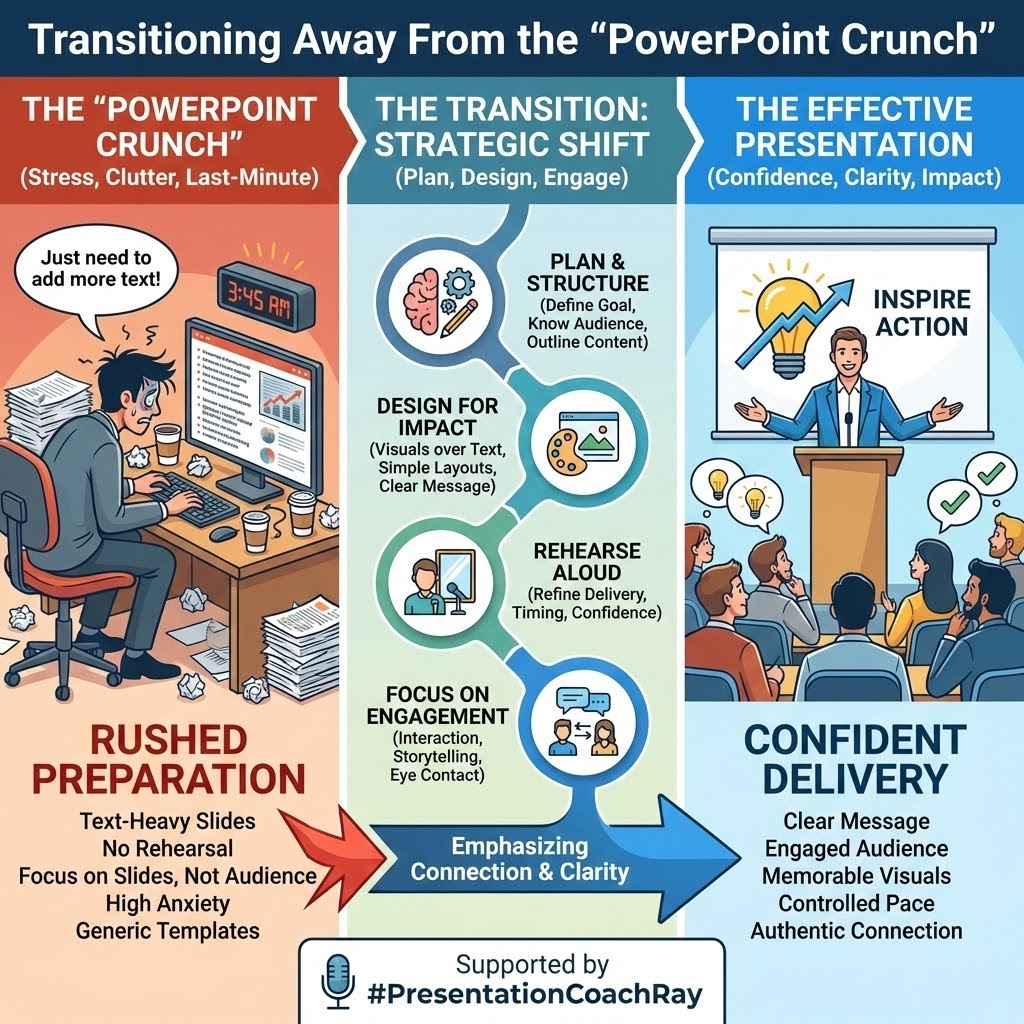
Transitioning away from the “PowerPoint crutch” is critical to developing executive presence, as reliance on slides fundamentally shifts a leader’s role from a commander of attention to a mere reader of information.
The worst-case scenario is the presenter who, onstage or online, says, “I know you’re not going to read this, but I’ll put it up anyway,” then turns their back on the audience and reads the slide.
The “PowerPoint crutch” is the single most important habit executives should break because it encourages leadership to turn their backs on the audience and read bullet points as if the screen were the “world’s largest teleprompter.”
To establish professional authority and enhance your executive presence, you must prioritize disciplined preparation over slide generation for several key reasons:
1. Eliminating the “Illusion of Control” in Leadership
Over-reliance on PowerPoint creates a dangerous “illusion of understanding” and an “illusion of control” without giving leaders actual command of the situation. In high-stakes environments, such as military operations, commanders have noted that PowerPoint hinders “discussion, critical thinking, and thoughtful decision-making.”
General James Mattis famously stated that “PowerPoint makes us stupid,” while General H.R. McMaster banned its use to ensure leaders engaged with the true complexity of problems rather than reducing them to “bullet-izable” lists.
Proper leadership authority is demonstrated when a leader can argue, discuss, and lobby for their key points without needing a slide to validate them.
2. Ensuring Audience Connection, Especially in Online Presentations
The “crutch” becomes even more detrimental in virtual settings. When presenters allow graphics to consume “95% of the screen,” the audience loses visual contact with the leader. This creates a gap between intent and perception, where “confidence feels flat” and “trust fades for reasons no one can name” because the human signal is misaligned or hidden behind data.
In remote and hybrid environments, your face, voice, and presence are the primary carriers of trust for effective executive communication. When slides dominate the screen, you unintentionally train your audience to listen to the deck instead of the leader.
If your leadership team is struggling to connect with remote employees, the solution isn’t more slides; it’s better delivery. Spend less time animating bullet points and more time rehearsing how you’ll improve your virtual executive presence by:
- Open with a clear statement of purpose.
- Maintain eye contact with the camera.
- Use your voice, pauses, and gestures to emphasize key ideas.
- Return to “full-face” mode regularly, even if you must show data.
Connection, not decoration, is what moves people to action.
3. Correcting the Presentation Preparation Workflow
The “crutch” often stems from a broken preparation process in which the PowerPoint application is used as a word processor to draft the entire talk. The narrative gets trapped in the slide deck rather than being owned by the speaker.
Disciplined presentation preparation reverses this workflow so that the message drives the medium:
- Outline First: Develop a simple outline that focuses on three key points and ends with a clear call to action. If you can’t summarize your talk on a single sheet of paper, your audience won’t be able to follow it on twenty slides.
- Script and Timing: Write or dictate the script, then read it aloud while timing yourself before you open PowerPoint. This ensures your narrative flows logically, lands your key points, and fits the allotted time. Only once you can deliver the message cleanly should you consider visuals.
- Graphics Last: Treat slides as supporting actors, not the star of the show. Only turn the finished script over for graphic creation after the narrative is set. Each slide should exist for a single purpose: to clarify, emphasize, or visualize something that is hard to convey with words alone.
- Separate Functions: Executives often confuse presentation slides with leave-behind documents. A slide designed to be read on its own cannot effectively support a live speaker; it competes for attention. Support graphics should ideally have minimal text, or none at all, much like a Steve Jobs product introduction, where the visual reinforces the story rather than replacing it.
When you optimize the presentation preparation workflow, you stop designing documents and start designing experiences.
4. Validating Subject Matter Expertise
Leaders are content experts, but they miss opportunities to demonstrate that expertise when they focus on reading slides rather than explaining their ideas. The more you depend on the deck, the less your audience attributes insight and authority to you.
History provides painful reminders of what happens when complex expertise is flattened into bullet points. After the Space Shuttle Columbia disaster, investigators criticized NASA’s reliance on dense PowerPoint charts that buried risk details in sub-bullets and ambiguous phrasing. The format itself made it harder to recognize how serious the situation truly was.
When you lean on slides, you:
- Signal that the “real” information lives on the screen, not in your head.
- Reduce nuanced judgments to over-simplified bullets.
- Miss opportunities to respond dynamically to questions or concerns.
By contrast, when you speak from well-prepared notes, or from a deeply internalized outline, you:
- Demonstrate mastery of your content and expertise.
- Show that you can adapt your message to the room and the moment.
- Build credibility as someone whose thinking extends beyond what’s written down.
- 5. Reclaiming the Executive Leader’s Role
Ultimately, transitioning away from the PowerPoint crutch is about reclaiming what it means to lead in the room and enhancing your executive presence.
Slides can be useful tools for visualizing data, sequencing a process, or sharing a model. But they should never replace the leader’s responsibility to:
- Set context and direction.
- Frame the problem and the options.
- Invite discussion, disagreement, and insight from the team.
- Make and communicate decisions with clarity.
When you stop hiding behind slides, several things happen quickly:
- Engagement rises because people look at you, not the wall.
- Decisions improve as more of the room’s intelligence is engaged.
- Your presence grows because you are now the source of the message, not the narrator of a deck.
The most effective executives I coach don’t abandon PowerPoint; they put it back in its proper place. Their executive preparation starts with thinking, writing, and rehearsal, not slide design. Their presence is grounded in eye contact, clear structure, and confident delivery, not in how many animations they can pack into 20 minutes.
If you want your team to see you as a leader worth following, start by breaking the habit that quietly undermines your authority: stop letting PowerPoint lead the meeting. You speak. The slides support. And your presence, not your software, does the heavy lifting.
Presentation Coach Ray Franklin
Author of “On The Job Speech Training”
Consultant to content experts to improve presentation skills
#ExecutivePresence #LeadershipCommunication #PresentationSkills
#PublicSpeaking #PowerPointTips #VirtualPresentations
#RemoteLeadership #SlideDesign #LeadershipDevelopment
#SubjectMatterExperts #PresentationCoachRay/
 #PresentationCoachRay